
Download Overlap Wallpaper – desktop overlay, image overlay, wallpaper overlay, business branding, logo overlay, computer wallpaper, customizable overlay, overlay tool
Overview
Overlap Wallpaper is a lightweight utility designed for Windows users seeking to enhance their desktop experience through visual customization. The application enables users to place an image—such as a business logo, personal photo, or design element—directly on top of their existing desktop wallpaper. This feature is particularly useful for maintaining visibility of important visuals without altering the underlying wallpaper. The app addresses the need for persistent, non-intrusive visual cues on the desktop, ideal for professionals who require constant access to branding elements, reminders, or design references. Target users include remote workers, digital creatives, small business owners, and anyone aiming to personalize their workspace with functional overlays.
Developed by Thomas P. Larson, the application has been available since June 27, 2011, indicating a long-standing presence in the productivity software space. Although the developer did not provide additional technical details or background, the app’s enduring relevance suggests a stable and reliable core functionality. Real-world use cases include branding consistency in home offices, displaying project timelines, or keeping motivational quotes visible throughout the workday. In the broader app ecosystem, Overlap Wallpaper fills a niche for minimalistic, task-oriented desktop tools that prioritize usability and visual clarity over complex features.
Key Features & Functionality
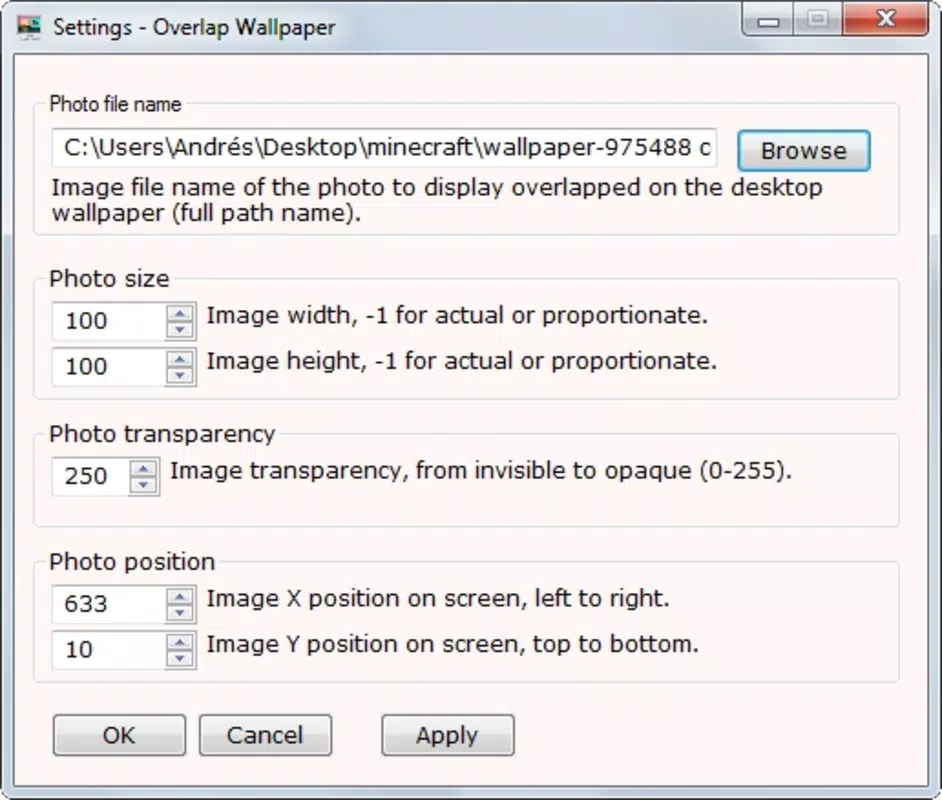
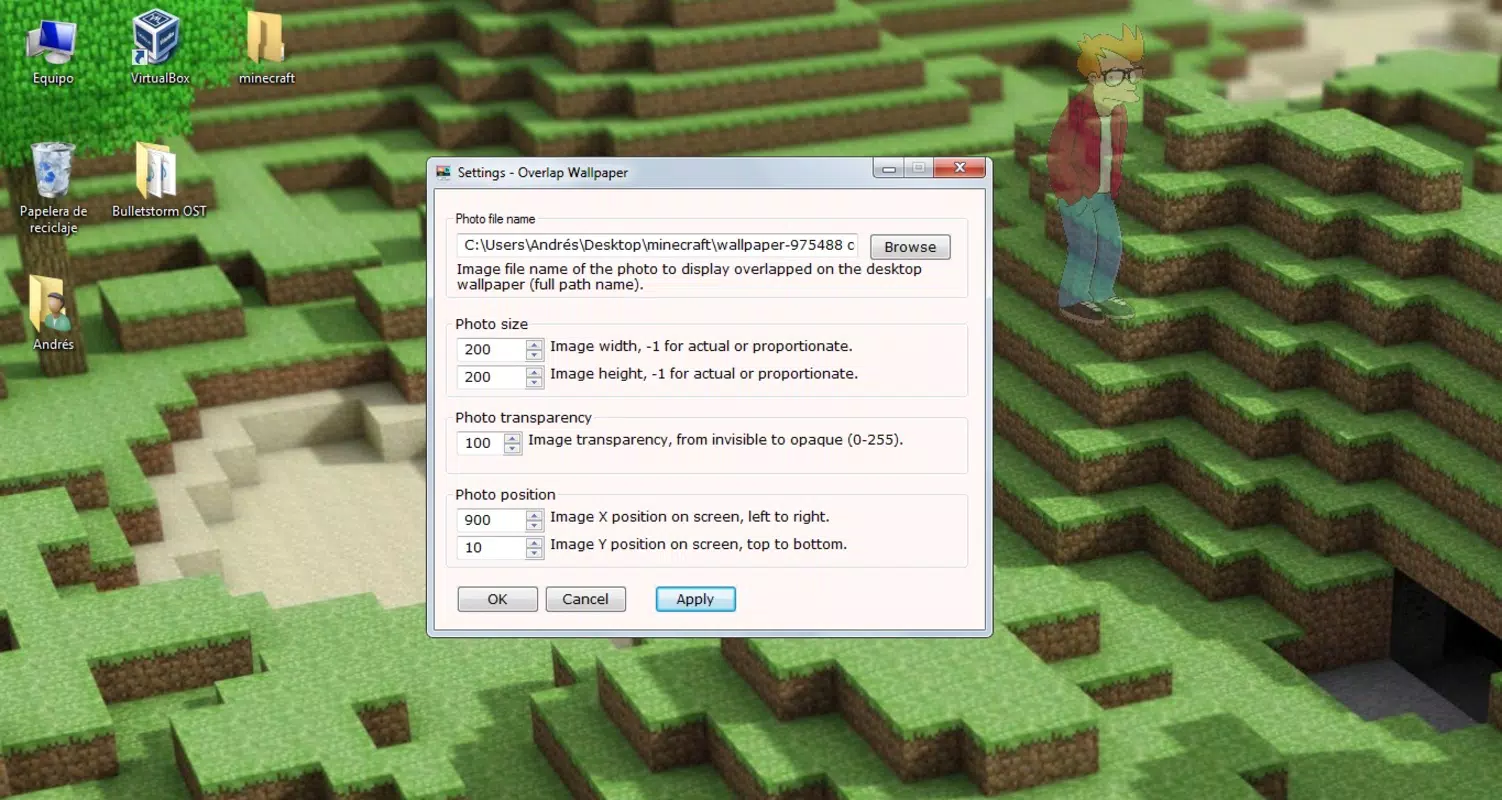
- Customizable Positioning: Users can precisely place the overlay image at any location on the desktop, ensuring it remains visible without interfering with system icons or open windows. This is ideal for placing a logo in the corner or a reminder in the center of the screen.
- Adjustable Size: The app allows scaling of the overlay image to fit various screen resolutions and layouts. Whether the user wants a small watermark or a large visual reference, resizing is intuitive and responsive.
- Opacity Control: The ability to adjust transparency levels lets users fine-tune how prominently the overlay appears. A semi-transparent logo, for instance, maintains brand visibility while preserving the original wallpaper’s aesthetic.
- Business Branding Support: By overlaying a company logo onto the desktop, professionals can reinforce brand identity during video calls, presentations, or daily work sessions, even when working remotely.
- User-Friendly Interface: The application features a clean, straightforward layout with minimal controls, enabling users of all technical levels to set up and manage overlays in seconds.
These features collectively support practical workflows, such as maintaining visual consistency in freelance work, using a project tracker as a persistent desktop element, or ensuring brand visibility during client meetings. The app’s simplicity ensures that users can focus on their tasks without being distracted by complex settings.
Interface, UX & Performance
Overlap Wallpaper presents a minimalistic interface that aligns with its utility-focused purpose. The layout is clean and uncluttered, with essential controls—positioning, size, and opacity—accessible through a simple window. Navigation is intuitive, requiring only a few clicks to load an image, adjust its placement, and apply the overlay. The app does not include unnecessary animations or pop-ups, contributing to a smooth and distraction-free experience.
Although the developer did not list formal performance metrics, the application’s small file size of 2.7 MB suggests efficient resource usage. It is expected to run smoothly on a wide range of Windows systems, including older or low-spec machines. Responsiveness is likely consistent across device categories, given the lightweight nature of the tool. Stability appears to be a strength, as the app has remained available for over a decade with no reported major issues. The lack of frequent updates may indicate a mature, bug-free release cycle, though users should verify compatibility with newer Windows versions if applicable.
Platform Compatibility & Technical Requirements
Overlap Wallpaper is designed exclusively for the Windows operating system. The current version is 1.0.1.0, with a file size of 2.7 MB. The developer did not specify minimum OS requirements or compatibility details for different Windows editions. As such, users should exercise caution when installing on newer Windows versions, particularly Windows 11 or future updates, without verifying official support. The application’s lightweight footprint suggests it may function on systems with limited resources, but compatibility with modern security protocols and system policies is not confirmed.
Pros and Cons
Pros
- Lightweight design with minimal system impact
- Simple, intuitive interface suitable for all skill levels
- Flexible positioning and resizing options
- Opacity control for seamless visual integration
- Free to download and use
- Effective for business branding and personal customization
Cons
- Compatibility information was not fully disclosed
- Version and release date suggest limited recent updates
- No support for multiple monitors was specified
- Developer did not provide technical documentation or support channels
- Platform availability restricted to Windows only
FAQ
Is Overlap Wallpaper safe to download and install?
Yes, the app is free and available from the developer’s official source. As a lightweight utility with no known malware history, it is considered secure for use on Windows systems.
Can I use Overlap Wallpaper on multiple monitors?
The developer did not specify support for multi-monitor setups. While the app may function on extended displays, this behavior is not officially confirmed.
Does Overlap Wallpaper require internet access?
No, the application operates offline. It does not connect to external servers or collect user data during normal use.
How do I update Overlap Wallpaper?
As the app has not seen recent updates since 2011, users should check the developer’s website for any newer versions. Manual checks are recommended for compatibility with current Windows versions.
Is Overlap Wallpaper compatible with Windows 11?
Compatibility was not officially stated. While the small file size and simple architecture suggest potential compatibility, users should test the app on their system before relying on it.
Final Thoughts
Overlap Wallpaper remains a niche yet valuable tool for users seeking a simple, effective way to overlay images on their desktop. Its focus on customization, ease of use, and low resource consumption makes it a reliable choice for professionals and casual users alike. While the lack of recent updates and limited compatibility details may raise concerns for some, the app’s proven track record and straightforward functionality continue to offer real value. For those in need of a persistent, customizable desktop overlay—especially for branding or workflow purposes—this tool delivers exactly what it promises.
Download Overlap Wallpaper now


